How to sign a PDF on Mac
without Adobe.
You don't need Adobe Acrobat to sign a PDF on a Mac. eSign is a native Mac app for signing and filling documents: drop in the file, place your signature with a click and export the signed copy. Here's how.
Updated By Alina Bohuslavska, maker of eSign
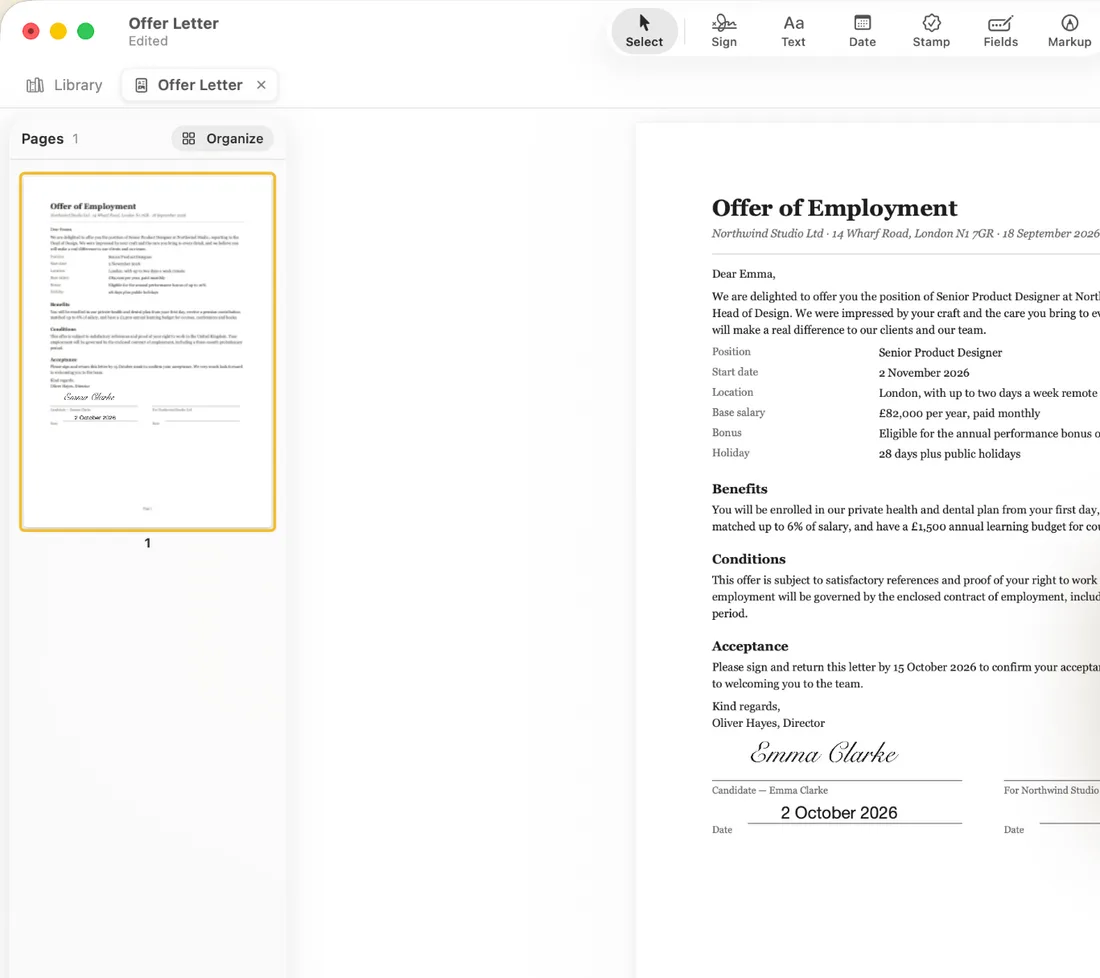
Open eSign on your Mac and drag the PDF onto the window (or press ⌘O). Click Sign, choose your signature, then click where it goes on the page. Use Export (⇧⌘E) to save a PDF or a Flattened PDF you can email or upload.
Sign a PDF on Mac in four steps
- 1
Open the document
Drag the file from Finder onto the eSign window, or click Sign Document (⌘O) and choose it. eSign opens PDFs, Word, Excel, PowerPoint and Pages files, and photos, each in its own tab.
- 2
Create your signature once
In New Signature, draw it with your trackpad or mouse, type your name in a handwritten font, or import a photo of your signature on paper (the paper is removed, only the ink stays). With Continuity Camera you can snap it with your iPhone.
- 3
Click to place it
Click Sign in the toolbar, pick your signature, then click on the signature line. Drag to move it and resize it from a corner. Use Date, Text and Fields for the rest of the page.
- 4
Export the signed PDF
Click Export (⇧⌘E) and choose PDF, or Flattened PDF (final) for a copy that can't be edited. PNG and JPEG are there too. Then attach it to an email or upload it wherever it needs to go.
Made for the Mac
- Several documents open at once in tabs
- Keyboard shortcuts: ⌘O open, ⌘S save, ⌘Z undo, ⇧⌘E export
- Drag files straight in from Finder
- Organize Pages to reorder, rotate, duplicate or delete pages
- Light and dark mode
Fill in forms on your Mac too
Click Fields to add text, signature, initials, date, checkbox, radio and dropdown fields anywhere on the page, then click a field to fill it. It works on flat PDFs and scans that have no fillable fields, and you can save a layout as a template.
What about Preview?
Preview, which comes with macOS, can also add a signature to a PDF. eSign adds form fields you place yourself, templates, a date picker, stamps, page organizing and Word or Pages files, and the same signatures and documents on your iPhone and iPad.
Is it free?
You can sign your first 2 documents for free, with no account. eSign Pro unlocks unlimited signing, and one Pro purchase covers iPhone, iPad and Mac with the same Apple ID.
Common questions
How do I sign a PDF on Mac without Adobe Acrobat?
Open the PDF in eSign, click Sign, choose your signature and click where it goes. Then click Export and save the signed PDF. No Adobe account or Acrobat subscription is involved.
Can I draw my signature with the trackpad?
Yes. Draw it with your trackpad or mouse in New Signature. You can also type your name in a handwritten font or import a photo of your signature.
Which macOS version do I need?
eSign for Mac needs macOS 15.0 or later.
Do I need to buy eSign separately for Mac?
No. One Pro purchase covers iPhone, iPad and Mac with the same Apple ID.
Are my documents uploaded?
They're never sent to us. With iCloud Drive on, they sync through your own private iCloud between your iPhone, iPad and Mac; with it off, they stay on your Mac.
Keep reading
Ready when the
next one lands.
Free to try · No account needed