Signing paperwork,
minus the printer.
eSign is a signature app for iPhone, iPad and Mac that lets you sign PDFs and fill in forms on your own device, with no account and no uploads.
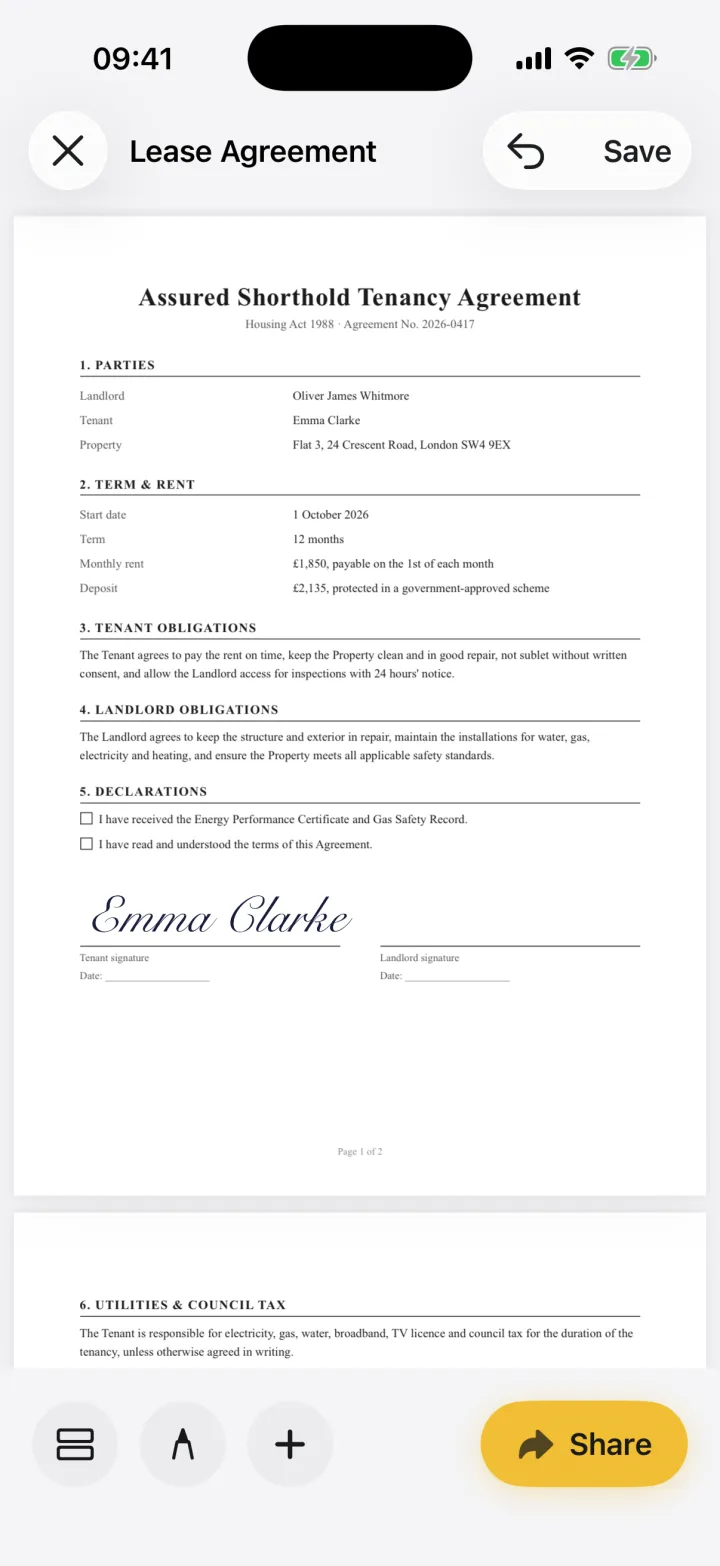
What eSign does
You open the document someone sent you: a PDF, a Word file, a photo or a paper page scanned with the camera. eSign turns it into a signable PDF on your device. You add your signature, initials, dates and any other details, then share a finished PDF by email, Messages, AirDrop or Files.
What makes eSign different
No account
Open the app and sign. No email, no password. DocuSign's app, by comparison, requires an account.
eSign vs DocuSignNothing is uploaded
Documents are converted, signed and stored on your device. They leave it only when you share them.
Privacy policyFills any PDF, even flat ones
Place text, date, checkbox, initials and signature fields on scans and PDFs that have no fillable fields.
How form filling worksYour real signature from paper
Photograph your signature and eSign removes the background, so it looks like ink on any document.
Three ways to make a signatureOne purchase, every device
eSign Pro unlocks iPhone, iPad and Mac with the same Apple ID, and the app works offline.
Who uses eSign
- Tenants and landlords sign tenancy agreements and inventories the day they arrive.
- Freelancers and consultants sign client contracts, NDAs and statements of work between meetings.
- New hires fill in and sign onboarding paperwork without printing it at home.
- Parents return school permission slips and medical forms the same evening.
- Small business owners sign quotes, invoices and supplier agreements on the go.
See the use cases for step-by-step walkthroughs for each situation.
The person behind eSign
eSign is designed, built and supported by Alina Bohuslavska, an independent iOS developer. It’s a one-person company: the same person writes the code, answers support emails and decides what gets built next. That keeps the app focused on one job, signing documents well, without accounts, ads or a sales team.
Is eSign
right for you?
An honest answer, so you don't have to find out after downloading.
Made for
- Tenants and landlords signing leases
- Freelancers signing client contracts
- New hires filling onboarding paperwork
- Parents returning school forms
- Small business owners signing invoices, NDAs and quotes
Not made for
- Sending a document to several people and collecting their signatures in order
- Signatures that need identity checks, certificates or an audit trail
- Wills, deeds and other documents that legally need a witness or wet ink
Need to send documents out for signature? See when DocuSign is the better fit.
Pricing & limits
Free to try, Pro unlocks unlimited signing.
You can sign and share your first 2 documents for free. One Pro purchase covers iPhone, iPad and Mac. Prices are shown in the app before you pay.
- Spreadsheets, slides and iWork files open as a snapshot of their first page
- Requires iOS 17 / iPadOS 17 or later, or macOS 15 or later
- Documents live on your device; keep backups of anything important
Try it on your
next document.
You can sign and share your first 2 documents for free.